 Tanvir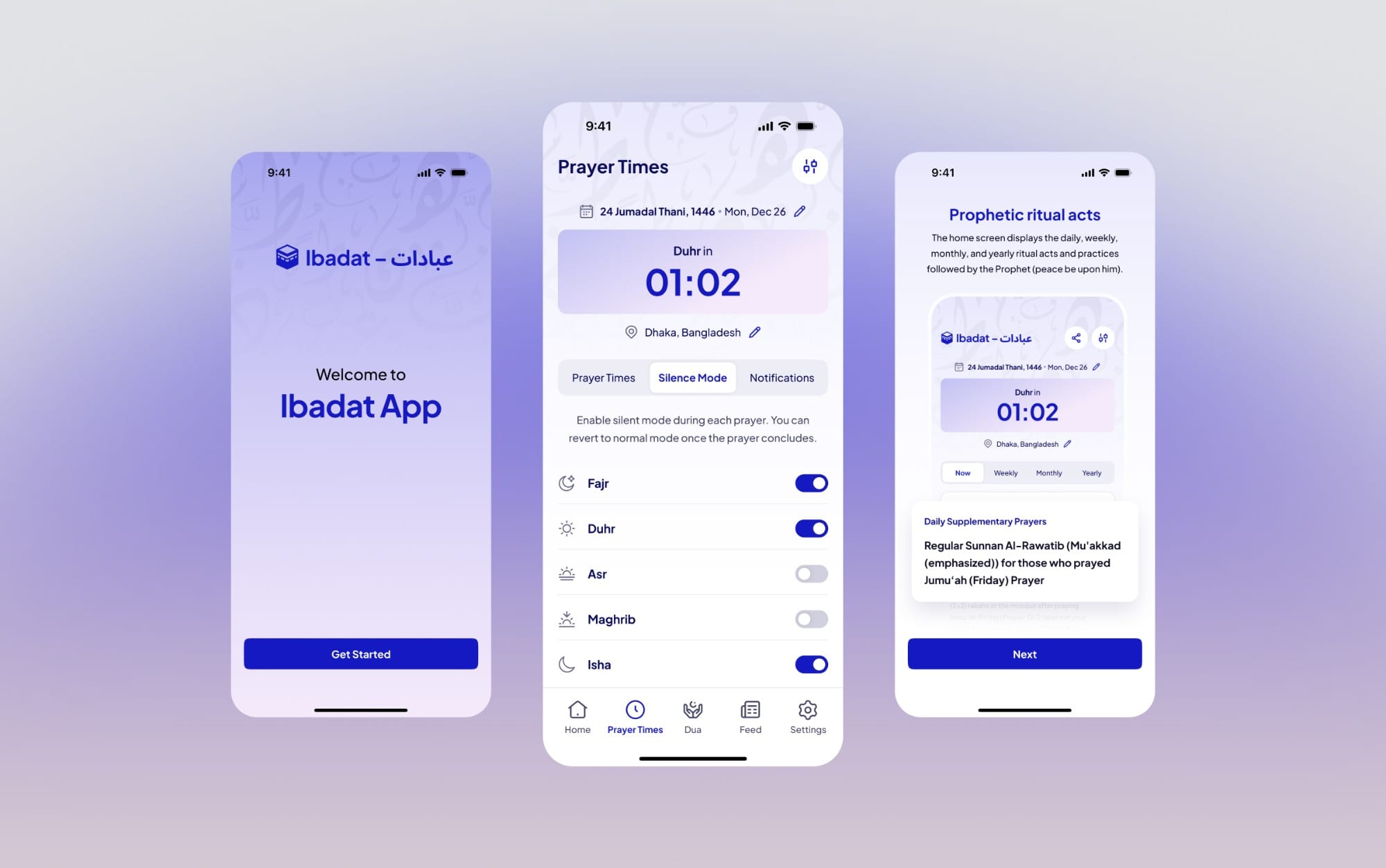
- UI/UX Designer
- Prayer times · Reminders · Silence mode · Dua reading · Settings
- 3 min
In development · Android beta out, iOS in testing
01/The project
Plenty of prayer apps, plenty of small snags
Ibadat is a daily prayer app I designed for a client. People open it for three things: the next prayer, a dua they can trust, and a phone that stays quiet while they pray. The client has an Android beta out, iOS is in testing, and development continues.
There are plenty of prayer apps already, so the question was never which features to add. It was which small things get in the way of using one every day.
- UI/UX Designer
- Android beta · iOS in testing
- Prayer times · Duas · Silence
02/At a glance
The screen people check before every prayer
The question people ask most is what the next prayer is, so the countdown comes first and everything about each prayer sits under it.
03/The approach
Every feature had to earn its place
The client and I agreed on one rule: a feature had to earn its place in a daily religious routine. Useful and low-effort beat matching other apps. That shaped the reminders, silence, and what happens when something goes wrong.
- Prayer times had to be dependable. If the time is wrong, nothing else in the app matters.
- Sources had to be visible. For duas, trust matters, so the reference stays with the text.
- Silencing the phone had to take almost no effort, instead of being one more setting to remember.
04/Reminders
Reminders that help without adding noise
- Fajr isn't one reminder. So waking for Fajr, the last part of the night, suhoor and an alert if you're awake each get their own time.
- Options open where you set them. Tap + to set the time, and its alert options open right below it, not on another screen.
- None and Silent aren't the same. None turns a reminder off. Silent still delivers the message, just without a sound.
05/Silence mode
Silence without another ritual
Normally you have to remember to silence your phone before every prayer. In Ibadat you choose once which prayers should silence it. While silence is on, home says so, and one tap puts the phone back to normal.
06/When it's off
When something's off, the app says what to check
A wrong prayer time undoes everything else, and a reminder that never arrives is worse than none. So both get a guided fix instead of a page of settings.
07/Duas
Duas you can trust, in context
Opening a dua shows the Arabic, transliteration, translation and source reference together, so nobody has to choose between reading it and checking where it came from.
08/The system
Two scripts, five prayers, a few controls
People open a prayer app several times a day, usually to check one thing, so I kept the set of parts small. The same stepper sets a reminder and corrects a prayer time. The same switch turns silence on for a prayer. Every prayer row carries two small icons for its reminder and its silence.
Duas put Arabic and English on one card, so each script gets its own size setting. I kept decorative Islamic patterns out of the interface and let the duas and the times carry its character.
09/Outcome
In beta, with a few things I'd still fix
The client has published an Android beta, iOS is in testing, and they're still building, so there's nothing measured to report yet.
Looking back at the designs, three things aren't finished. The reminder help screen shows battery optimisation as "Disabled" in red, although disabled is exactly what we want. The Maghrib correction says it can't be adjusted, yet still shows plus and minus. And the reminder for the last third of the night, which the client asked for, isn't designed yet. They're small, but they're the kind of thing that makes people doubt the times.