 Tanvir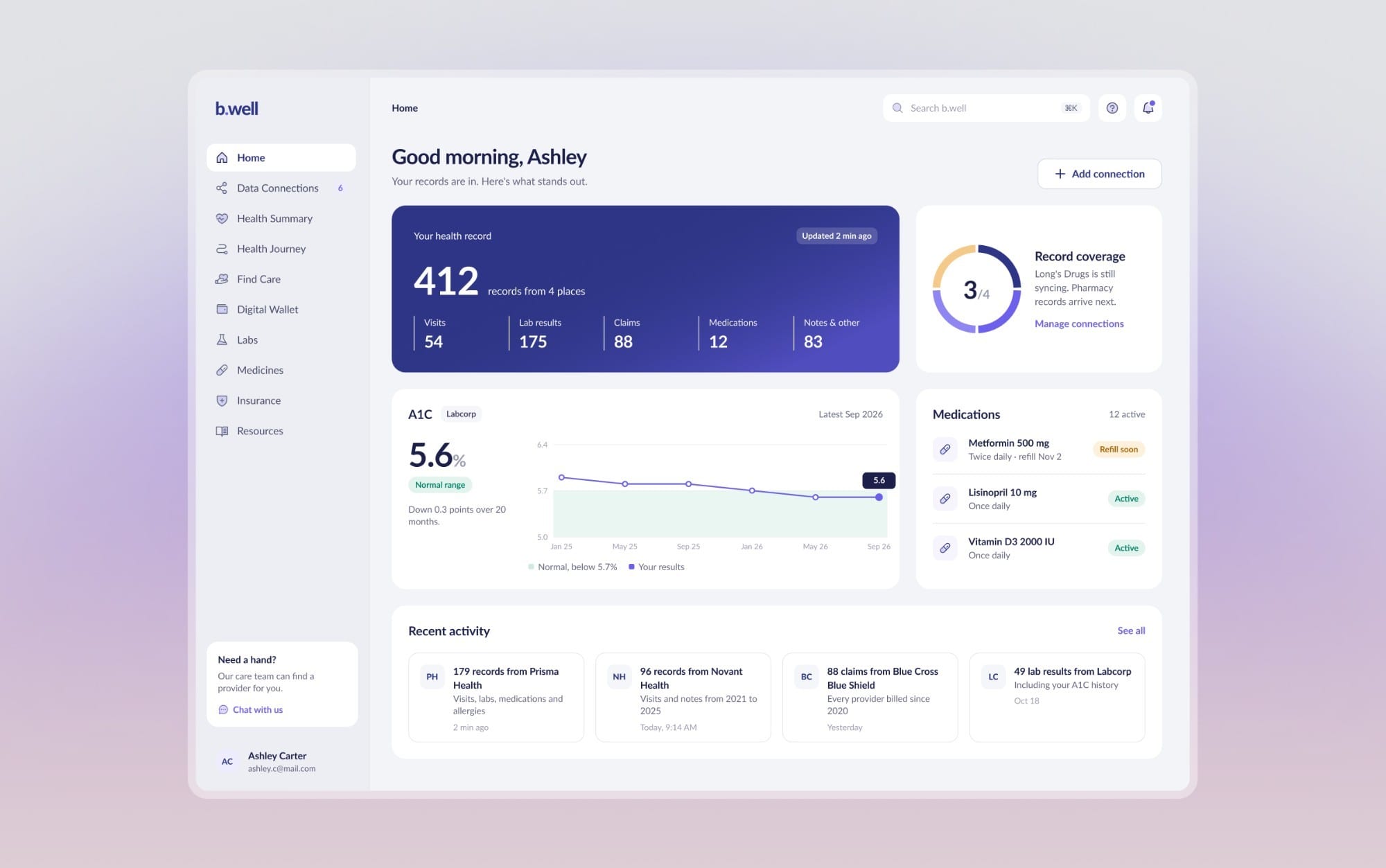
- Sole UI/UX Designer
- Onboarding · Data Connections · Search · Consent · Dashboard
- 2 min
01/The project
Getting your health records into one place
b.well is a health app that brings a person's records together from their doctors, hospitals, labs, pharmacies and insurer. I was the only designer on Data Connections, the part where people find their providers and connect them, and the onboarding that leads into it. It's the first thing people do, and the old flow made it feel like paperwork.
The work is under NDA, so this page shows a selection of it. The screens are a refreshed pass on that work. They keep b.well's colours and type, and all of them come from one component library in Figma.
- Data Connections and onboarding
- Responsive web
- Healthcare
02/At a glance
Where connecting starts now
The old first step, and the hub that replaced it.
03/The problem
Connecting records felt like paperwork
In the old flow, people picked a record type, then searched, then found out one click deeper that their doctor had several portals. The automatic route asked for a photo of an ID, a selfie and a hand-off to the phone, and three failed tries ended on a screen with nowhere to go. The consent step still showed template text.
So the work was mostly about one thing: getting someone to their first connected portal without guessing what comes next.
04/Two ways in
Two ways in, not one gate
The ID check used to stand in front of everyone. Now the first visit asks: should we find your records, or would you rather add providers yourself? Neither path depends on the other.
- Everyone met an ID check first. It's now one of two paths, and searching yourself needs no check at all.
- Verifying meant a photo ID, a selfie and a QR hand-off. It's now a code by text and the last four of the SSN.
- Three failed tries locked people out. Now nothing is locked, and the screen offers three ways forward.
05/Search
Finding the right John Smith
On the do-it-yourself path, everything starts from one box: doctors, hospitals, labs, pharmacies and insurers. Results already say where a doctor keeps your records.
- People picked a record type before they could search. One box now covers doctors, hospitals, labs, pharmacies and insurers.
- There was no way to tell which John Smith was yours. Each result shows the networks and the address, and the map shows where the office is.
- A doctor who wasn't on b.well just didn't show up. They stay in the list with a Request button.
06/Connecting
Leaving b.well to sign in
Connecting means leaving b.well to sign in somewhere else, which is where trust is easiest to lose. So every step says plainly what happens and what b.well will see.
- The sync list showed names and nothing else. Each portal now shows its records and your last visit.
- Consent still read {connection.entity}. It's now plain words, and Continue stays off until the box is ticked.
- After signing in, a spinner and no end in sight. Three named steps, and people can close the window while we keep going.
07/After
After the first connection
Once records arrive, the product stops being a setup checklist and starts telling you what needs attention.
- There was no sense of how much was connected. A coverage gauge counts types of records, and every doctor shows portals connected, like 1 of 3.
- Expired sign-ins hid in a long list. The one that needs you gets its own card at the top.
08/Looking back
What mattered most
The two changes that mattered most were structural. The identity check moved from the front door to an optional path, and portal details moved onto the card where people were already deciding. The refresh mostly makes those decisions easier to see.